
Contact Us

If you still have questions and are an active SimuTech customer, please submit a request.

  • Ansys Training
  • Skills Center
  • Consulting
  • About
  • Contact Support
  • Home

  • Installation

      • Troubleshooting

          • Errors & Solutions

              • License Management

                  • Info

                      • Remote Solve Manager

                          • Employee Login

                          Can't find what you're looking for?

                          Contact Support

                          Installation & Licensing Center

                          • Home
                          • Installation
                            Installation Guides Installation Tasks Requirements & Info Optional Configurations Uninstallation
                          • Troubleshooting
                            Troubleshooting Guides License Manager Connectivity Issues License Checkout Issues Application Functionality Issues Windows OS / Hardware Issues CAD Plugin Issues Project Specific Issues Uninstallation Guides Diagnostic Resources & Logs Other Tasks
                          • Errors & Solutions
                            Behavior Based Issues & Solutions Error Messages & Solutions
                          • License Management
                            FlexNet Licensing Shared Web Licensing Elastic Licensing Licensing Portal Administration License Borrowing Reporting & Usage Stats Other
                          • Info
                          • Remote Solve Manager
                          + More

                          HOW TO - Manually Reinstall Prerequisite Microsoft Software

                          Authored by Caleb Scharf November 1st, 2026 16834 views 6 likes KB956111

                          Description

                          Ansys relies on prerequisite Microsoft software packages to run properly. If one of these packages is corrupt or missing, Ansys can have issues that are difficult to solve.

                          The most common ones are the Microsoft Visual C++ Redistributable packages ("vcredist"). This article shows how to reinstall them from your Ansys setup files, then reinstall Ansys.


                          Common Causes

                          • A hardware error corrupted the prerequisite installation files.
                          • A Windows Update broke some Microsoft Visual C++ Redistributable dependencies.
                          • .DLL files for the Microsoft Visual C++ Redistributable installations are not registered.
                          • Antivirus software corrupted the installation of these files.


                          Solution

                          Before You Start

                          You need the Ansys ISO files or the primary package zip files. You cannot use the automated installer for this.


                          1. Reinstall the Microsoft Visual C++ Redistributables

                          1. Open File Explorer and browse to the folder where your Ansys setup files are.

                            Note: If you downloaded the ISO files, the setup files are on ISO1.
                          2. Open the prereq folder.
                          3. Find every file with "vcredist" in its name.

                            Note: Different versions of Ansys use different versions of the vcredist package. Install every version in the prereq folder, both x64 and x86, no matter the system.
                          4. Run each installer and click Install or Repair.
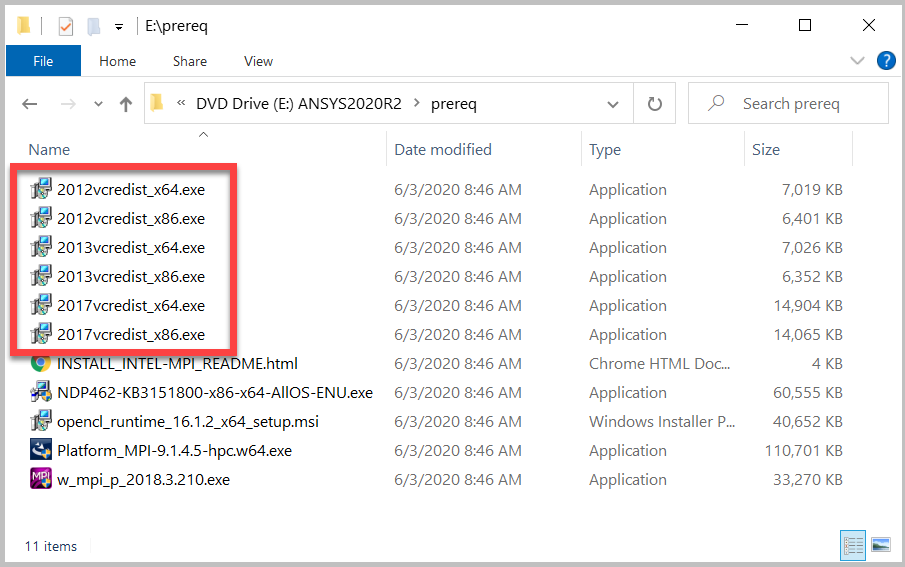
                            Home Share DVD Drive ANSYS2020R2 > prereq o Name 2012vcredist_x64.exe 2012vcredist_x86exe 2013vcredist_x64.exe 2013vcredist_x86exe 2017vcredist_x64.exe 2017vcredist_x86.exe ME. html NDP462-KB3151800-x86-x64-Allos-ENU.exe 'ß opencl_runtime_ 16. I Platform_MPI-g. I A .5-hpcw64 exe items Date modified 6/3/2020 846 AM 6/3/2020 8•A6 AM 6/3/2020 8•A6 AM 6/3/2020 8:46 AM 6/3/2020 8-46 AM 6/3/2020 8:46 AM 6/3/2020 8:46 AM 6/3/2020 8:46 AM 6/3/2020 8:46 AM 6/3/2020 8'A6 AM 6/3/2020 8:46 AM Type Application Application Application Application Application Application Chrome HTML Docm Application Windows Installer P. Application Application Search prereq Size 7,019 KB 6401 KB 7.026 KB 14.904 KB 14,065 KB 60,555 KB 40,652 KB 110.701 KB 33,270 KB Microsoft Visual C.• 2012 Redistributable (x64) - 
Microsoft Visual C++ 2012 
Redistributable (x64) - 11.0.61030 
Modify Setup
                          5. If an installer shows the error "Another instance is already installed", replace the existing package before you continue:

                            Note: This error typically means "MS VC++ 2015-2019" is installed. This is a single installation package, not multiple installations. Ansys does not install version 2017 if version 2015-2019 is already installed. This is usually not a problem, but since you are troubleshooting an issue, replace it.
                            1. In the Windows Control Panel, uninstall "MS VC++ 2015-2019".
                            2. Install version 2017 from the prereq folder.
                            3. If another application needs version 2015-2019, download and install it from Microsoft's latest supported Visual C++ downloads page. Most computers do not need it.
                          6. Restart your computer if prompted.


                          2. Reinstall Ansys

                          1. Reinstall your Ansys software using the Ansys Download & Installation Guide. To save time, you do not need to uninstall it first.

                            Note: You must do this step. Ansys registers certain .dll files during installation. Repairing the redistributables alone does not necessarily fix the problem, because those .dll files also need to be re-registered.


                          3. Verify It Worked

                          1. Open your Ansys software and check that the issue you started with no longer occurs.
                          2. If the issue continues, follow HOW TO - Comprehensively Reinstall Ansys.

                          Was this helpful?

                          Yes
                          No

                          6 out of 14 found it helpful

                          Related Articles

                          HOW TO - Check Ansys License Server Version

                          HOW TO - Install an Ansys FlexNet License Key/File

                          HOW TO - Uninstall Ansys Software

                          HOW TO - Specify an Ansys License Server

                          Popular Articles

                          Ansys Download & Installation Guide

                          INFO - Ansys Hardware Recommendations & Supported 3rd Party Software

                          HOW TO - Uninstall Ansys Software

                          HOW TO - Test & Fix FlexNet License Manager Connectivity Issues

                          HOW TO - Install an Ansys FlexNet License Key/File

                          Was this helpful?

                          Yes
                          No
                          Give feedback about this article

                          Can't find what you're looking for?

                          Contact Support

                          Recently Updated

                          • HOW TO - Add Firewall & Port Exceptions for Ansys License Manager
                          • HOW TO - Turn Off or Change the Ansys License Expiration Warning
                          • HOW TO - Install Ansys MCP Servers (VS Code & GitHub Copilot)
                          • ERROR - The application requires the use of OpenGL version 4.3 (Ansys Mechanical)
                          • HOW TO - Run Product & CAD Configuration Manager
                          • ERROR - Gather Diagnostic Information Fails with NoClassDefFoundError CountingOutputStream on Linux
                          • HOW TO - Download the Ansys Electronics Package (HFSS, Maxwell, Icepak, SIwave, Nuhertz)
                          • INFO - Ansys Hardware Recommendations & Supported 3rd Party Software
                          • HOW TO - Obtain Usage Data for Usage Reporting
                          • General Inquiries & Sales:
                          • (800) 566-9190
                          • Info@SimuTechGroup.com
                          • Contact Support
                          • Software
                          • Services
                          • Case Studies
                          • Ansys Training
                          • Consulting
                          • Technical Support
                          • About SimuTech
                          • Careers
                          • Privacy

                          © 2025 SimuTech Group


                          Knowledge Base Software powered by Helpjuice

                          Definition by Author

                          0
                          0
                          Expand NEW TAB

                          Hi there! 👋

                          How are you liking the Installation Center?

                          Terrible

                          Bad

                          OK

                          Good

                          Excellent

                          Feedback Successfully submitted