 Installation & Licensing Center
ERROR - Unable to Attach Geometry from Creo
 Authored by Steve Barnett
February 22nd, 2023
12787 views
10 likes
Authored by Steve Barnett
February 22nd, 2023
12787 views
10 likes
 KB1585263
ERROR
When launching Workbench from the Ansys tab in Creo, you receive the following error:
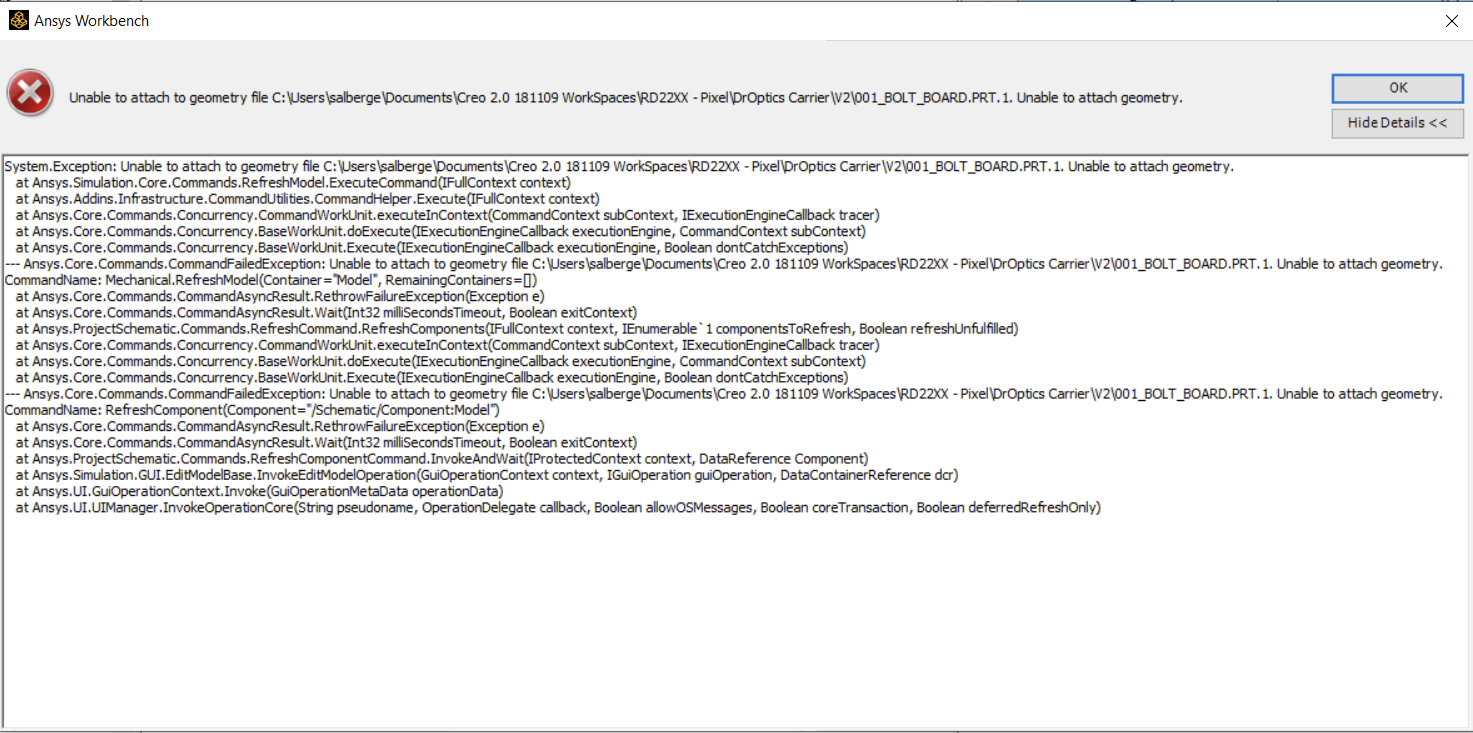
Ansys Workbench

Unable to attach to geometry file C:\Users\Username\Documents\Creo 2.0\\\filename  Unable to attach geometry.

System.Exception: Unable to attach to geometry file C:\Users\Username\
at Ansys.Simulation.Core.Commands.RefreshModel.ExecuteCommand(IFullContext context)
at Ansys.Addins.Infrastructure.CommandUtilities.CommandHelper.Execute(IFullContext context)
at Ansys.Core.Commands.Concurrency.CommandWorkUnit.executeInContext(CommandContext, IExecutionEngineCallback tracer)
at Ansys.Core.Commands.Concurrency.BaseWorkUnit.doExcute(IExecutionEngineCallback executionEngine, CommandContext subContext)
at Ansys.Core.Commands.Concurrency.BaseWorkUnit.Execute(IExecutionEngineCallback executionEngine, Boolean dontCatchExceptions)
--- Ansys.Core.Commands.CommandFailedException: Unable to attach to geometry file C:\Users\Username\Documents\Creo 2.0\\\filename Unable to attach geometry.
CommandName: Mechanical.RefreshModel(Container="Model", RemainingContainers=□)
at Ansys.Core.Commands.CommandAsyncResult.RethrowFailureException(Exception e)
at Ansys.Core.Commands.CommandAsyncResult.Wait(In32 milliSecondsTimeout, Boolean exitContext)
at Ansys.ProjectSchematic.Commands.RefreshCommand.RefreshComponent(IFullContext context, IEnumerable'1 componentsToRefresh, Boolean refreshUnfulfilled)
at Ansys.Core.Commands.Concurrency.CommandWorkUnit.executeInContext(CommandContext subContext, IExecutionEngineCallback tracer)
at Ansys.Core.Commands.BaseWorkUnit.doExecute(IExecutionEngineCallback executeEngine, CommandContext subContext)
at Ansys.Core.Commands.BaseWorkUnit.Execute(IExecutionEngineCallback executionEngine, Boolean dontCatchExceptions)
--- Ansys.Core.Commands.CommandFailedException: Unable to attach to geometry file C:\Users\Username\Documents\Creo 2.0\\\filename Unable to attach geometry.
at Ansys.Core.Commands.CommandAsyncResult.RethrowFailureException(Exception e)
at Ansys.Core.Commands.CommandAsyncResult.Wait(Int32 milliSecondsTimeout, Boolean exitContext)
at Ansys.ProjectSchematic.Commands.RefreshComponentCommand.InvokeAndWait(IProtectedContext context, DataReference Component)
at Ansys.Simulation.GUI.EditModelBase.InvokeEditModelOperation(GuiOperationContext context, IGuiOperation guiOperation, DataContainerReference dcr)
at Ansys.UI.GuiOperationContext.Invoke(GuiOperationMetaData operationData)
at Ansys.UI.UIManager.InvokeOperationCore(String pseudoname, OperationDelegate callback, Boolean allowOSMessages, Boolean coreTransaction, Boolean deferredRefreshOnly)
Software & Version
Creo 7.0, Ansys Workbench 2021R2
*This example was taken from this version but is not necessarily limited to this version.
Description/Cause
The specific geometry contains item(s) preventing the import.
*This is one cause that has been identified, though it may not the only potential cause of this error.
Solution
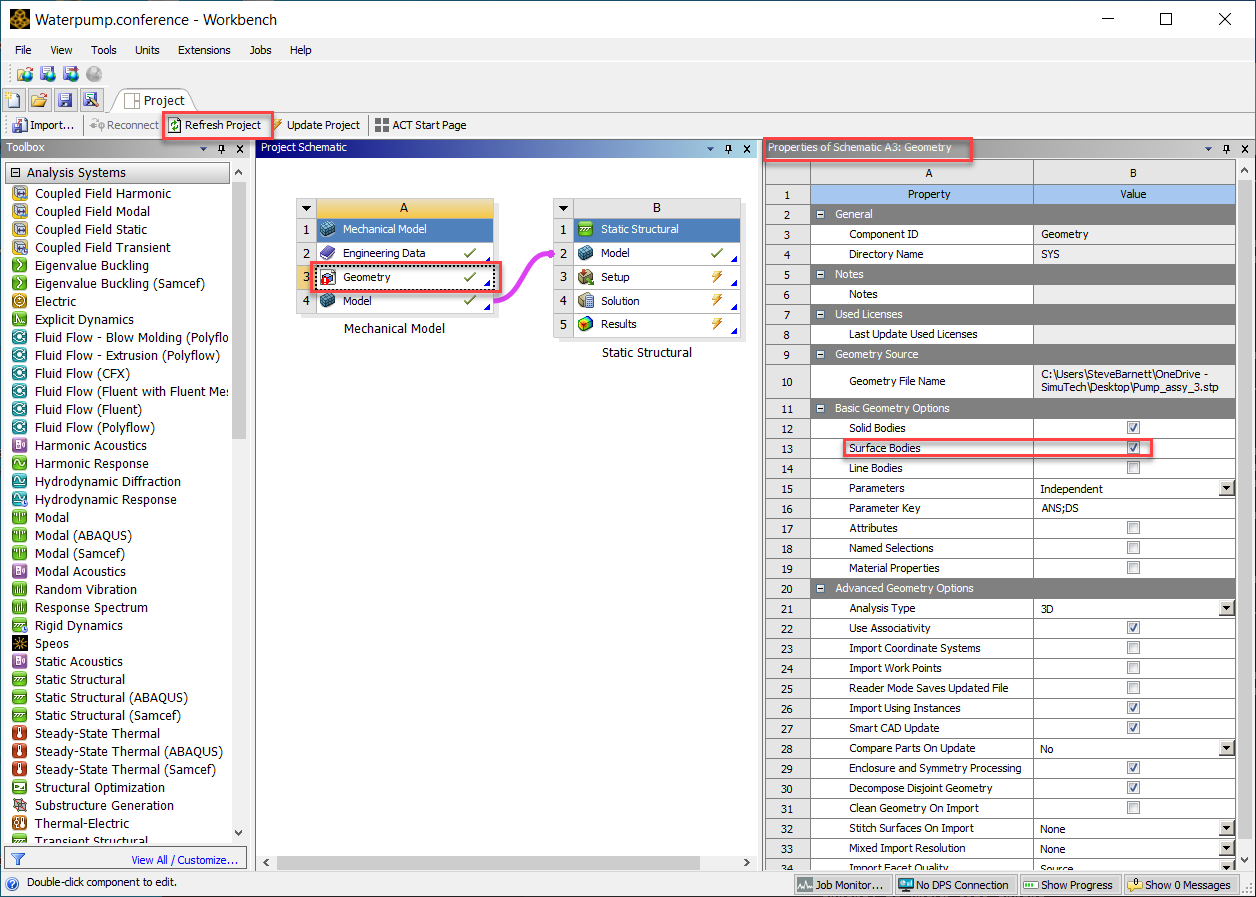
- Open the model in Workbench
- Right mouse click on Geometry and select Properties
- Uncheck Surface Bodies
- Refresh Project the Geometry
- Import from Creo once again