
Contact Us

If you still have questions and are an active SimuTech customer, please submit a request.

  • Ansys Training
  • Skills Center
  • Consulting
  • About
  • Contact Support
  • Home

  • Installation

      • Troubleshooting

          • Errors & Solutions

              • License Management

                  • Info

                      • Remote Solve Manager

                          • Employee Login

                          Can't find what you're looking for?

                          Contact Support

                          Installation & Licensing Center

                          • Home
                          • Installation
                            Installation Guides Installation Tasks Requirements & Info Optional Configurations Uninstallation
                          • Troubleshooting
                            Troubleshooting Guides License Manager Connectivity Issues License Checkout Issues Application Functionality Issues Windows OS / Hardware Issues CAD Plugin Issues Project Specific Issues Uninstallation Guides Diagnostic Resources & Logs Other Tasks
                          • Errors & Solutions
                            Behavior Based Issues & Solutions Error Messages & Solutions
                          • License Management
                            FlexNet Licensing Shared Web Licensing Elastic Licensing Licensing Portal Administration License Borrowing Reporting & Usage Stats Other
                          • Info
                          • Remote Solve Manager
                          + More

                          HOW TO - Create an Environment Variable

                          Authored by Nick Heberle November 3rd, 2026 21172 views 19 likes KB1335336

                          Description

                          Some Ansys settings use environment variables, which are named settings in Windows that programs read when they start. You write an environment variable as VARIABLE_NAME=VARIABLE_VALUE.

                          Use this article when an Ansys guide or instruction tells you to create an environment variable on a Windows computer.

                          Solution

                          Before You Start

                          Ansys uses System environment variables unless the guide or instructions you are following say otherwise. You need Local Administrator rights on the computer to create or change a System environment variable.


                          Create the Environment Variable

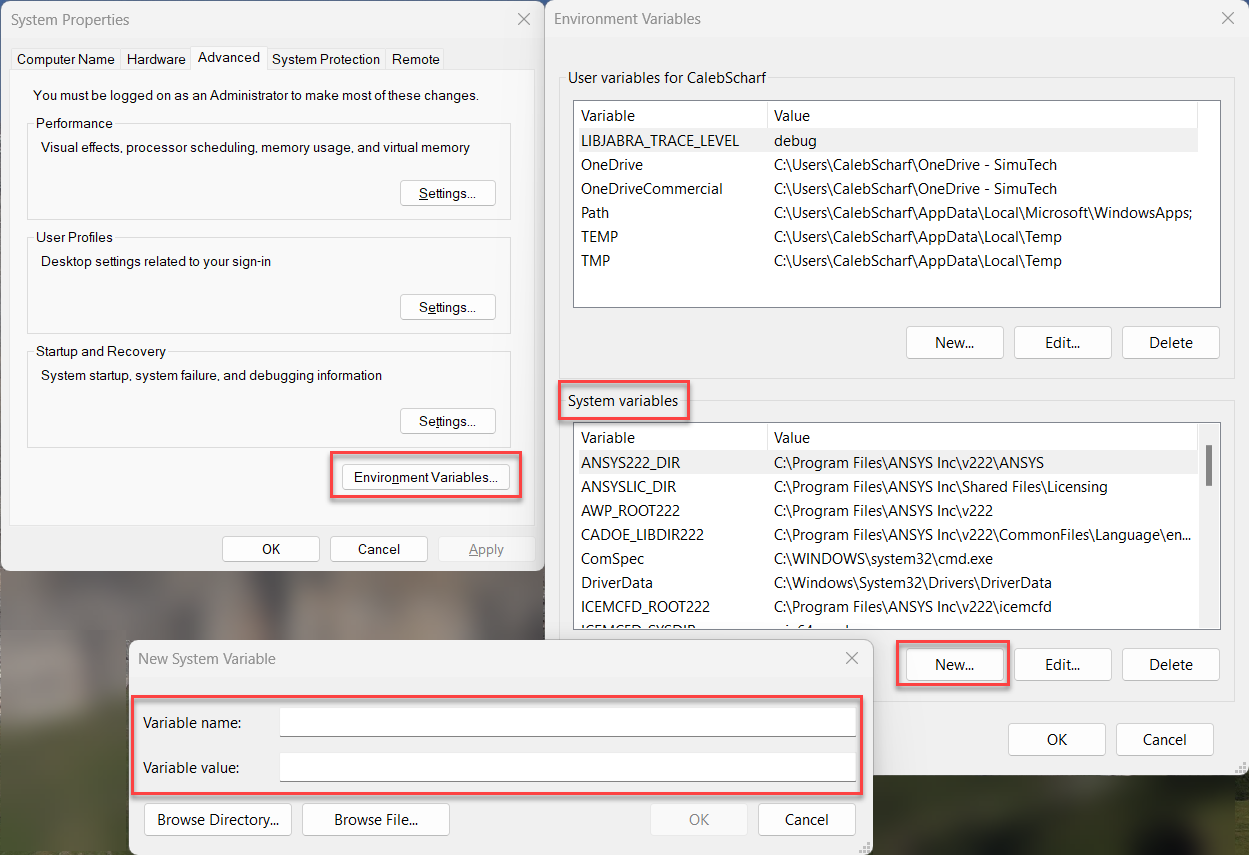
                          1. Open the Windows Start menu, search for "Edit the system environment variables", and open it.
                          2. In the "System Properties" window, click Environment Variables.
                          3. Under "System variables", click New.
                          4. Enter the variable's name in "Variable name" and its value in "Variable value", then click OK.
                          5. Click OK in the "Environment Variables" window, then in the "System Properties" window, to save your changes and close both windows.


                          Verify It Worked

                          1. Close and reopen any Ansys applications you had open, so they read the new variable.
                          2. Open a new Command Prompt window, type echo %VARIABLE_NAME%, and press Enter. Replace VARIABLE_NAME with the name of your variable.
                          3. Check that the output shows the value you entered. If it shows %VARIABLE_NAME% instead, Windows does not have the variable: check its spelling under "System variables" and try again.

                          Was this helpful?

                          Yes
                          No

                          19 out of 30 found it helpful

                          Related Articles

                          HOW TO - View License Usage & Status

                          HOW TO - Set User License Privileges via an Options File

                          HOW TO - Gather Ansys Diagnostic Logs

                          HOW TO - Enable the Ansys Idle Timeout Feature

                          Popular Articles

                          Ansys Download & Installation Guide

                          INFO - Ansys Hardware Recommendations & Supported 3rd Party Software

                          HOW TO - Uninstall Ansys Software

                          HOW TO - Test & Fix FlexNet License Manager Connectivity Issues

                          HOW TO - Install an Ansys FlexNet License Key/File

                          Was this helpful?

                          Yes
                          No
                          Give feedback about this article

                          Can't find what you're looking for?

                          Contact Support

                          Recently Updated

                          • ERROR - The application requires the use of OpenGL version 4.3 (Ansys Mechanical)
                          • HOW TO - Install Ansys MCP Servers (VS Code & GitHub Copilot)
                          • HOW TO - Run Product & CAD Configuration Manager
                          • ERROR - Gather Diagnostic Information Fails with NoClassDefFoundError CountingOutputStream on Linux
                          • HOW TO - Download the Ansys Electronics Package (HFSS, Maxwell, Icepak, SIwave, Nuhertz)
                          • INFO - Ansys Hardware Recommendations & Supported 3rd Party Software
                          • HOW TO - Obtain Usage Data for Usage Reporting
                          • HOW TO - Fix Ansys Installation / Functionality Issues
                          • HOW TO - Edit the Windows Hosts File
                          • General Inquiries & Sales:
                          • (800) 566-9190
                          • Info@SimuTechGroup.com
                          • Contact Support
                          • Software
                          • Services
                          • Case Studies
                          • Ansys Training
                          • Consulting
                          • Technical Support
                          • About SimuTech
                          • Careers
                          • Privacy

                          © 2025 SimuTech Group


                          Knowledge Base Software powered by Helpjuice

                          Definition by Author

                          0
                          0
                          Expand NEW TAB

                          Hi there! 👋

                          How are you liking the Installation Center?

                          Terrible

                          Bad

                          OK

                          Good

                          Excellent

                          Feedback Successfully submitted