
Contact Us

If you still have questions and are an active SimuTech customer, please submit a request.

  • Ansys Training
  • Skills Center
  • Consulting
  • About
  • Contact Support
  • Home

  • Installation

      • Troubleshooting

          • Errors & Solutions

              • License Management

                  • Info

                      • Remote Solve Manager

                          • Employee Login

                          Can't find what you're looking for?

                          Contact Support

                          Installation & Licensing Center

                          • Home
                          • Installation
                            Installation Guides Installation Tasks Requirements & Info Optional Configurations Uninstallation
                          • Troubleshooting
                            Troubleshooting Guides License Manager Connectivity Issues License Checkout Issues Application Functionality Issues Windows OS / Hardware Issues CAD Plugin Issues Project Specific Issues Uninstallation Guides Diagnostic Resources & Logs Other Tasks
                          • Errors & Solutions
                            Behavior Based Issues & Solutions Error Messages & Solutions
                          • License Management
                            FlexNet Licensing Shared Web Licensing Elastic Licensing Licensing Portal Administration License Borrowing Reporting & Usage Stats Other
                          • Info
                          • Remote Solve Manager
                          + More

                          HOW TO - Run Product & CAD Configuration Manager

                          Authored by Caleb Scharf November 2nd, 2026 16506 views 4 likes KB955764

                          Description

                          Run the Ansys Product & CAD Configuration tool when Ansys software does not open, or when components are missing or not working as expected.

                          It fixes many common issues caused by improper or corrupt Ansys installation files or settings.

                          Solution

                          Run Product & CAD Configuration

                          Run as Administrator

                          If you do not select Run as administrator in step 1, the tool does not work properly and can cause more problems.


                          1. Open the Start menu ➜ ANSYS version ➜ right-click Product & CAD Configuration version ➜ More ➜ Run as administrator.

                            Note: Replace version with the most recent Ansys version installed on your computer, for example 2026 R1.
                             
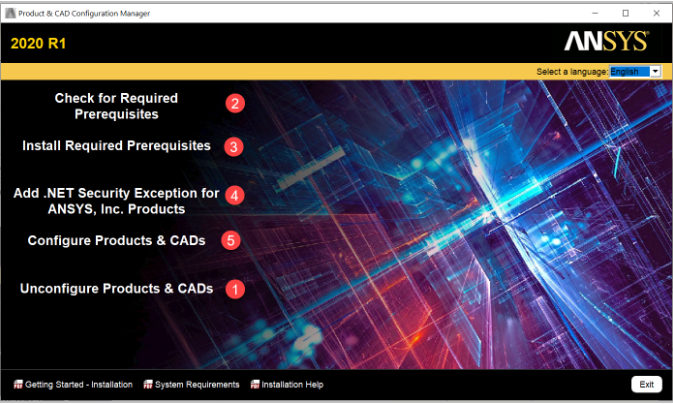
                          2. Run each of the 5 steps in the tool, in the order shown in the picture below.

                            Note: In step #1, select all products and unconfigure them.
                           

                          Check If a Product Is Configured (Advanced Users)

                          To quickly check whether a product is configured, click Unconfigure Products & CADs. This does not tell you whether the product was configured properly.

                          • If the boxes are unchecked and you can click them, the product was configured before.
                          • If the boxes are unchecked and you cannot click them, the product is not configured or is not installed.


                          Verify It Worked

                          1. Open the Ansys software that had the issue, and check that it opens and the missing components work.
                          2. If the issue continues, see HOW TO - Fix Ansys Installation / Functionality Issues.

                          Was this helpful?

                          Yes
                          No

                          4 out of 12 found it helpful

                          Related Articles

                          HOW TO - Reset Ansys License Preferences

                          Ansys Download & Installation Guide

                          HOW TO - Uninstall Ansys Software

                          HOW TO - Reset Your Ansys Profile Folder

                          Popular Articles

                          Ansys Download & Installation Guide

                          INFO - Ansys Hardware Recommendations & Supported 3rd Party Software

                          HOW TO - Uninstall Ansys Software

                          HOW TO - Test & Fix FlexNet License Manager Connectivity Issues

                          HOW TO - Install an Ansys FlexNet License Key/File

                          Was this helpful?

                          Yes
                          No
                          Give feedback about this article

                          Can't find what you're looking for?

                          Contact Support

                          Recently Updated

                          • INFO - Ansys Hardware Recommendations & Supported 3rd Party Software
                          • HOW TO - Obtain Usage Data for Usage Reporting
                          • HOW TO - Fix Ansys Installation / Functionality Issues
                          • HOW TO - Edit the Windows Hosts File
                          • HOW TO - Verify the Ansys License Manager Is Running
                          • ERROR - Framework Error Caught When Opening Workbench Files
                          • HOW TO - Create an Environment Variable
                          • HOW TO - Run Product & CAD Configuration Manager
                          • HOW TO - Verify the Integrity of Ansys Installation Files
                          • General Inquiries & Sales:
                          • (800) 566-9190
                          • Info@SimuTechGroup.com
                          • Contact Support
                          • Software
                          • Services
                          • Case Studies
                          • Ansys Training
                          • Consulting
                          • Technical Support
                          • About SimuTech
                          • Careers
                          • Privacy

                          © 2025 SimuTech Group


                          Knowledge Base Software powered by Helpjuice

                          Definition by Author

                          0
                          0
                          Expand NEW TAB

                          Hi there! 👋

                          How are you liking the Installation Center?

                          Terrible

                          Bad

                          OK

                          Good

                          Excellent

                          Feedback Successfully submitted